
d-52C 取扱説明書'ı İndir – d-52C ユーザーマニュアル, Android 7.1.1, エデュケーショナルソフトウェア
Genel Bakış
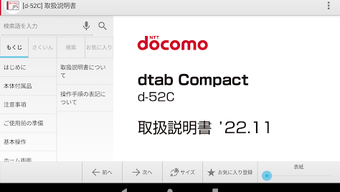
The d-52C 取扱説明書 is a dedicated educational application designed exclusively for users of the d-52C tablet, developed by Lenovo Tablet CCSCSDK. This desktop application serves as a comprehensive user manual, offering detailed guidance on the device’s features, functions, and operational procedures. It is specifically tailored to enhance user understanding and ease of navigation for the d-52C model, making it an essential tool for both new and experienced users.
The primary purpose of this software is to provide clear, structured explanations of the tablet’s functionalities, including setup, settings, and troubleshooting steps. It enables users to access step-by-step instructions directly from the app, reducing reliance on external documentation. The app also includes interactive elements that allow users to launch specific device settings and functions directly from the explanatory text, streamlining the user experience and improving efficiency.
Target users include individuals who own or are using the d-52C tablet, particularly those seeking a convenient, on-device reference. This includes students, educators, and general consumers who rely on the tablet for daily tasks. The app is not compatible with other devices, ensuring that content remains specific and relevant to the d-52C model. It is available free of charge, making it accessible to all users of the device.
Ana Özellikler ve Yetkinlikler
- Interactive User Manual – The app provides a full digital version of the d-52C user manual, accessible directly on the device. Users can search, scroll, and navigate through sections with ease.
- Direct Function Launch – From within the manual, users can trigger certain device settings and functions, such as Wi-Fi configuration or display settings, without leaving the guide.
- Device-Specific Content – All information is tailored exclusively to the d-52C tablet, ensuring accuracy and relevance for this specific model.
- Offline Accessibility – Once installed, the app functions without an internet connection, allowing users to access the manual anytime, anywhere.
- Compact Size – At just 20.2 MB, the application is lightweight and suitable for devices with limited storage capacity.
These features are particularly useful in real-world scenarios such as setting up the tablet for the first time, resolving connectivity issues, or learning advanced features like screen rotation or battery management. By integrating instructional content with direct access to settings, the app reduces the time and effort required to perform common tasks, enhancing overall usability and user confidence.
Kullanıcı Arayüzü, İş Akışı ve Performans
The user interface of the d-52C 取扱説明書 is designed with simplicity and clarity in mind. It features a clean, text-based layout with intuitive navigation, allowing users to browse through sections using a hierarchical menu or search function. The app organizes content into logical categories, such as setup, hardware overview, and troubleshooting, enabling users to quickly locate relevant information.
Navigation is straightforward, with back buttons and section links that maintain context. The workflow is optimized for on-the-go access, supporting quick jumps from a description to the corresponding device setting. This seamless integration between instruction and action enhances efficiency, especially for users who prefer learning by doing.
The developer did not specify resource usage details. Performance observations are based on general software behavior patterns. The app is expected to operate smoothly on devices running Android 7.1.1, given its lightweight nature and minimal system requirements. Stability is assumed to be consistent, as the application is designed for a single device model and does not include complex background processes.
Uyumluluk ve Sistem Gereksinimleri
The d-52C 取扱説明書 is compatible exclusively with the d-52C tablet by Lenovo Tablet CCSCSDK. It requires Android 7.1.1 (Nougat) as the minimum operating system version. The application has a file size of 20.2 MB, making it suitable for devices with limited storage capacity.
Exact system requirements were not listed. The developer did not provide additional system requirements. Compatibility information is limited to the specified device and OS version. The app is not designed to run on other tablet models or devices outside the d-52C series. Users should verify that their device matches the supported model before attempting installation.
Artılar ve Eksiler
Artılar
- Exclusive content tailored specifically for the d-52C tablet
- Interactive features that allow direct access to device settings
- Free to download and use
- Compact size (20.2 MB) with minimal storage impact
- Functions offline after installation
Eksiler
- Not compatible with devices other than the d-52C model
- No support for newer Android versions beyond 7.1.1
- Limited to a single device, reducing versatility
- Exact performance and resource usage details not disclosed
- Updates may require data usage, potentially incurring charges
SSS Bölümü
d-52C 取扱説明書 diğer tabletlerle uyumlu mu?
Hayır. Uygulama yalnızca d-52C tablet için tasarlanmıştır ve diğer cihazlarda çalışmaz.
Uygulamayı internet bağlantısı olmadan kullanabilir miyim?
Evet. Kurulumdan sonra uygulama tamamen çevrim dışı çalışır ve kullanıcı kılavuzuna ve etkileşimli özelliklere internet bağlantısı gerektirmeden erişim sağlar.
Uygulama ücretli bir abonelik gerektiriyor mu?
Hayır. Uygulama ücretsiz olarak indirilebilir ve kullanılabilir, ek bir ücret veya abonelik gerektirmez.
Güncellemeler ne sıklıkla yayınlanıyor?
Güncelleme sıklığı belirtilmemiştir. Kullanıcıların güncellemeleri manuel olarak uygulama veya cihaz ayarları üzerinden kontrol etmeleri önerilir.
Uygulama güvenli bir şekilde kurulabilir mi?
Evet. Uygulama Lenovo Tablet CCSCSDK tarafından resmi olarak geliştirilmiş ve yetkili kanallar aracılığıyla dağıtılmıştır. Üçüncü taraf reklamları veya müdahaleci izinler içermez.
Son Düşünceler + CTA
The d-52C 取扱説明書 delivers a focused, practical solution for users of the d-52C tablet. Its interactive design, compact size, and offline functionality make it a valuable companion for anyone seeking to maximize their device’s potential. While its compatibility is limited to a single model, this specificity ensures high relevance and accuracy.
For d-52C owners, this app is not just a reference tool—it’s a productivity enhancer. It simplifies complex tasks by connecting instructions to real actions, reducing learning curves and improving user confidence. The free price point and lightweight design further enhance its appeal.
Download d-52C 取扱説明書 now to unlock the full potential of your tablet with confidence and ease.







